CiteFox

Free desktop app · Mac, Windows and Linux · Source-available

Free AI visibility tracker for Google AI Overviews, ChatGPT and Perplexity

Know whether AI answers recommend you when buyers ask, which of your pages they cite, which competitor they pick instead, and exactly what to fix to win them back. A free, local alternative to Profound, Peec AI, Otterly.AI and Semrush’s AI toolkit.

The demo runs in your browser with sample data. No install, no sign-up.

A 75-second tour with music. Browsers start videos muted: press Sound on to hear it.

Download CiteFox

Free for Mac, Windows and Linux. Pick your computer.

Install in a minute

  1. 1. Download

    Pick your computer above. It is one file, free, no sign-up.

  2. 2. Open

    Mac: open CiteFox from Applications (Apple has checked it). Windows: the first time, click More info › Run anyway. Full steps

  3. 3. Add your keys and run a check

    Paste your own API keys, add your site and buyer questions, then run your first check.

Pay only for what you use, and keep your data

CiteFox is free. Checks run on your own pay-as-you-go accounts, so you pay the services directly at their price, nobody marks it up, and your data never leaves your computer.

What you connect

A search data API
Asks each AI engine your buyer questions and saves every answer and source. Pay-as-you-go credits; free tiers are enough to try it.
Claude Code or Codex, on the plan you already have
Reads your site, writes buyer questions, finds competitors and writes fix briefs. It runs on your existing Claude Code or Codex plan, so there is no extra AI cost. A pay-as-you-go AI model API key works too.
  • Before every check CiteFox shows the credits it will use; setup and Settings show the price in US dollars per check and per month, and checks stop at a monthly budget you set.
  • At the list price of the default search plan, ten buyer questions on all six engines come to about 30 US cents. Your plan sets your price; the app shows the real number.
  • Setup links to each sign-up page and tests every key. Keys are stored in your operating system’s keychain.

Local and private

  • Everything is stored on your computer, in a local database (SQLite).
  • There is no CiteFox cloud: your SEO data, prompts, results and keys stay with you.
  • Keys live in the OS keychain: macOS Keychain, Windows Credential Manager or the Linux Secret Service.
  • Results and reports open offline; only new checks and AI help need the internet.

CiteFox itself receives only the details you give when you join and an anonymous daily version ping. Privacy details

What you get with CiteFox

  • Start free, keep control of costs

    A free desktop app on your own keys. You see the cost before every check and set a monthly cap, with no per-seat fees.

  • Get the right page cited, not just the domain

    Set the page that should win each question; CiteFox tells you if that page, another of yours, your brand without a link, or someone else was cited.

  • Know if each fix worked

    Log a change and CiteFox re-checks for 14 days, then says whether it worked, made no change or got worse.

  • Send a client-ready report after every check

    Visibility, What changed, Impact review, Pitch / audit, Content plan and Head-to-head, rebuilt for you each time.

  • Put your agency’s name on the work

    Your agency’s name and logo with “Prepared for” each client, or your company’s, or none.

  • Back every number with proof

    Click any number, in the app or a report, to see the exact questions and AI answers behind it.

See the sourced comparison with Profound, Peec AI, Otterly.AI and six more

Win the AI answers your buyers read

Find out where AI search cites you, where it picks a competitor, and what to change, with GEO and AEO tools for agencies and marketing teams in one free desktop app.

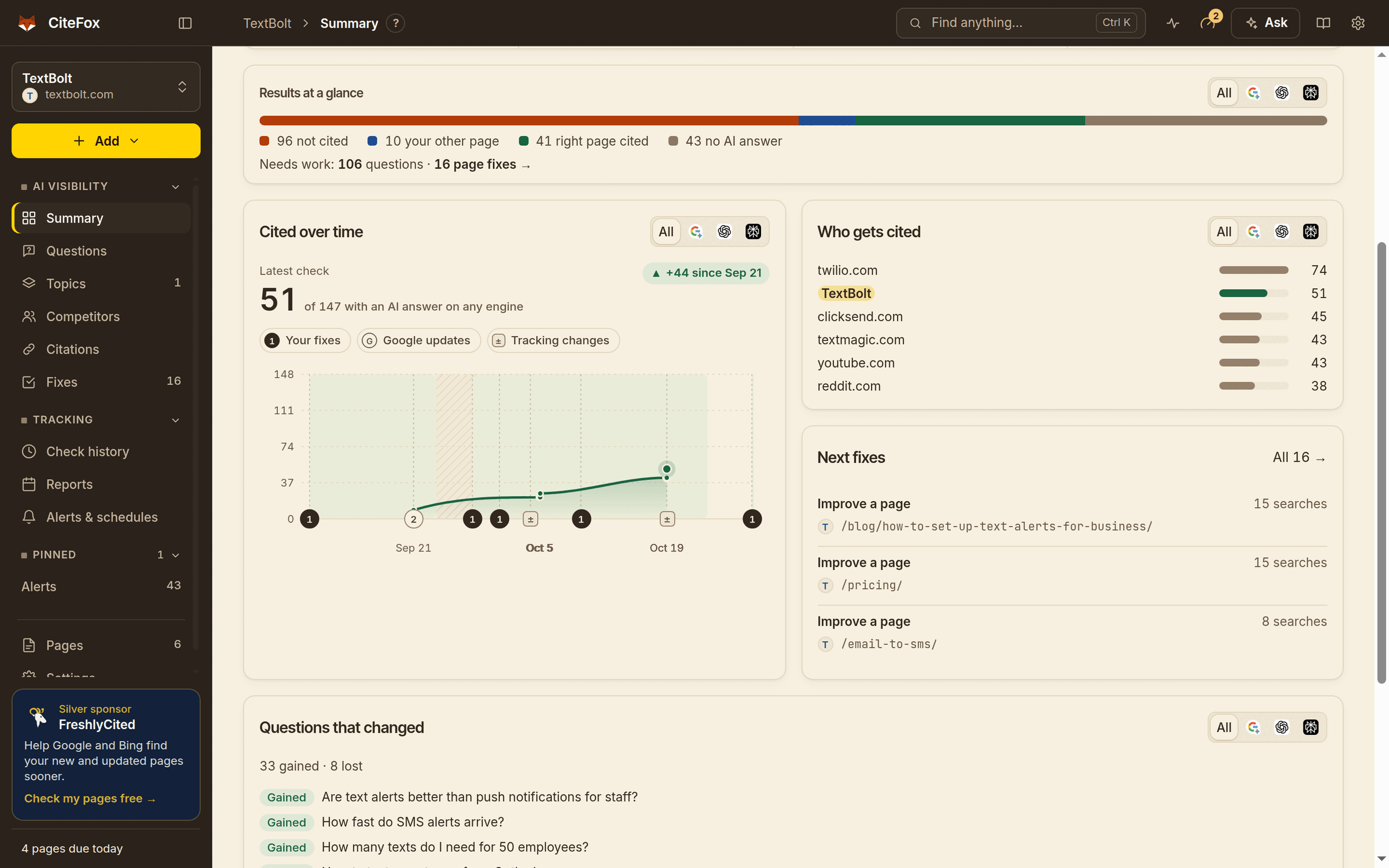
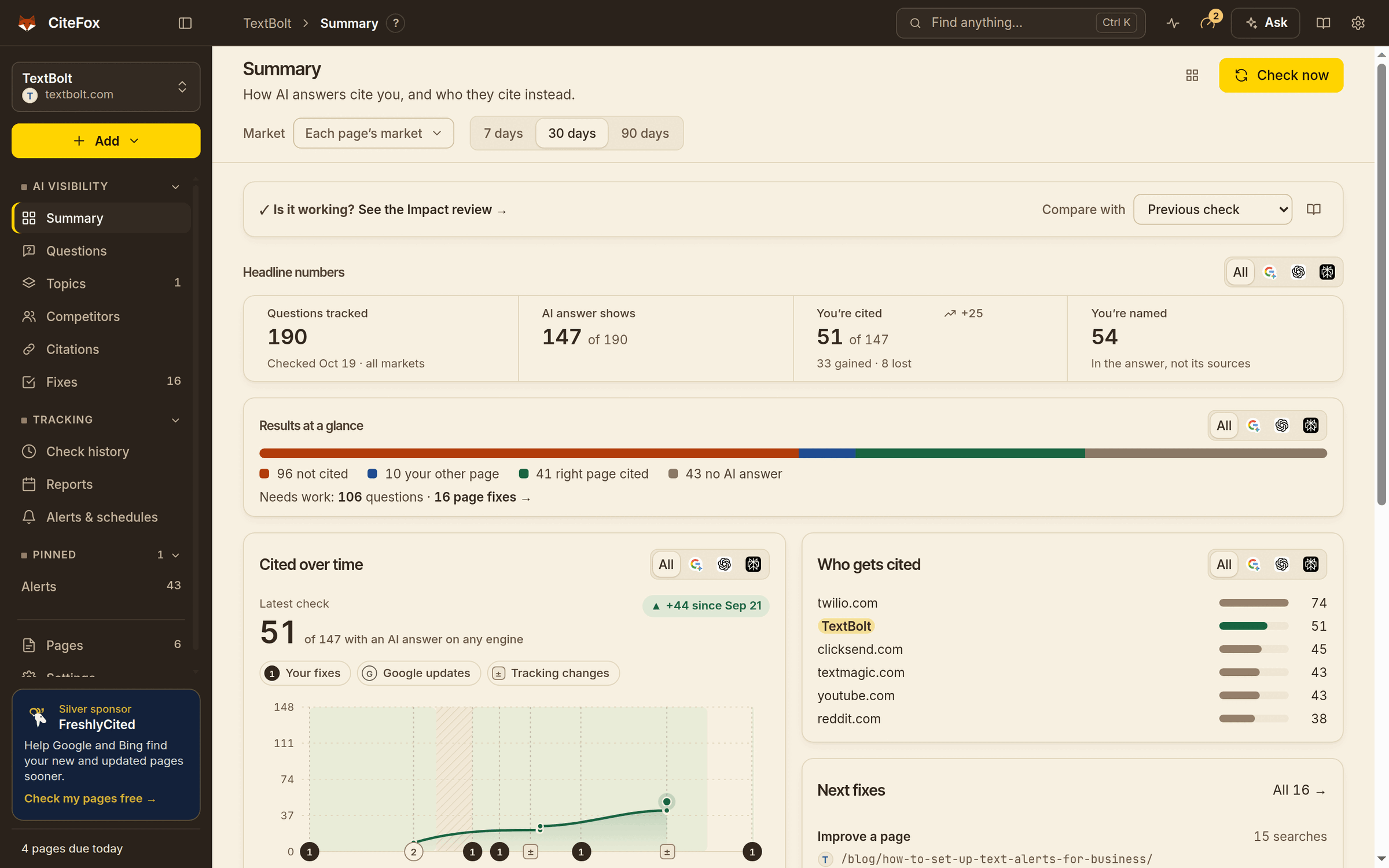
See in seconds whether AI recommends you

One score and trend for how often AI answers cite your website, across six AI engines and every country and language you sell in. Each fix you made is marked on the line, and every number opens the exact questions behind it.

CiteFox Summary screen with the AI visibility score, trend and next fixes

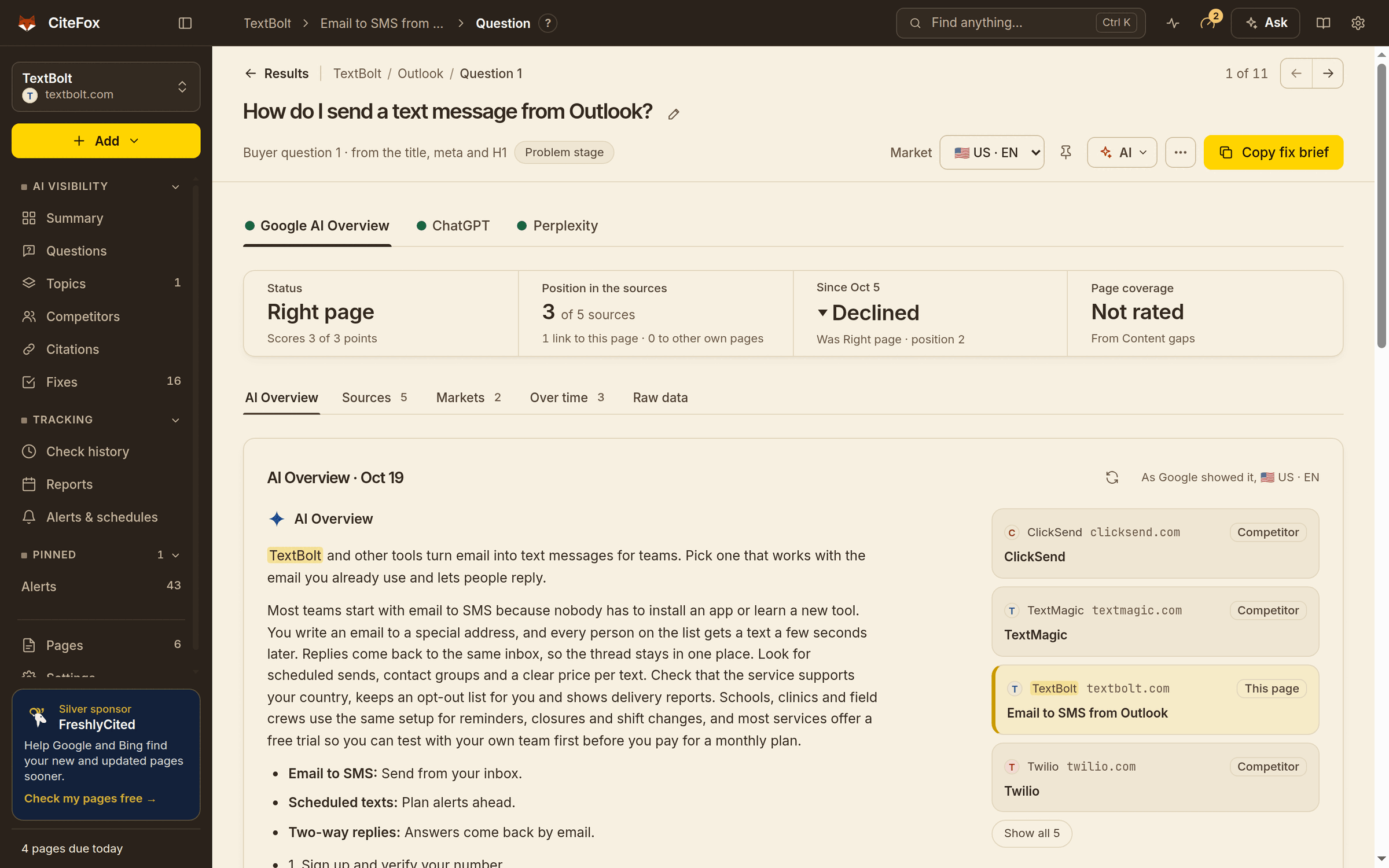
Read exactly what AI tells your buyers

Open any buyer question to read the full AI answer, every source it links and how it changed between checks. You see at a glance whether the right page was cited, another page of yours, your brand named without a link, or someone else.

A question in CiteFox showing the full AI answer and the sources it cites

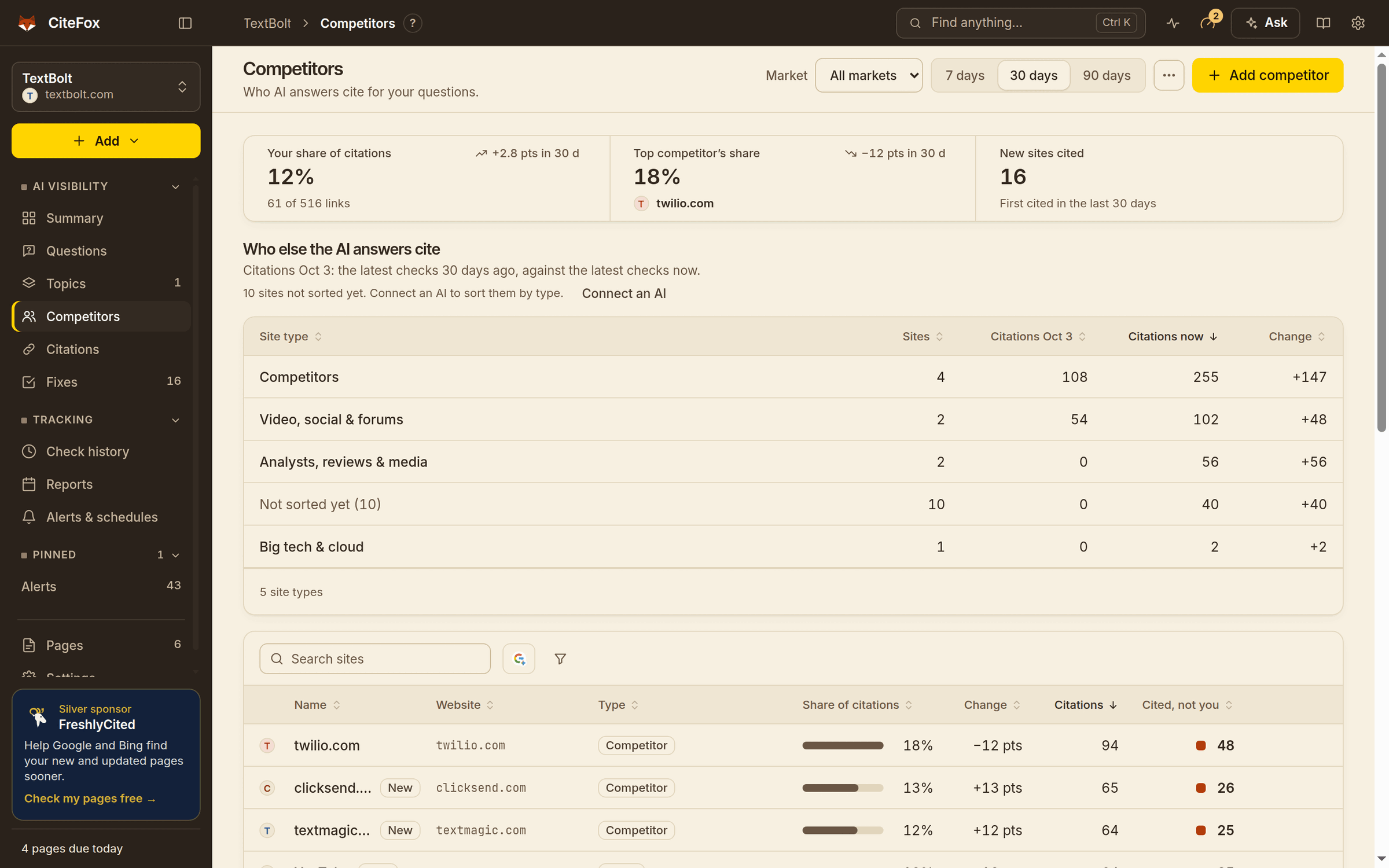
Know which competitor AI picks instead of you

See who takes your place in AI answers, on which questions and engines, so you know where to fight and which pages to beat.

CiteFox Competitors screen listing the sites AI answers cite instead of you

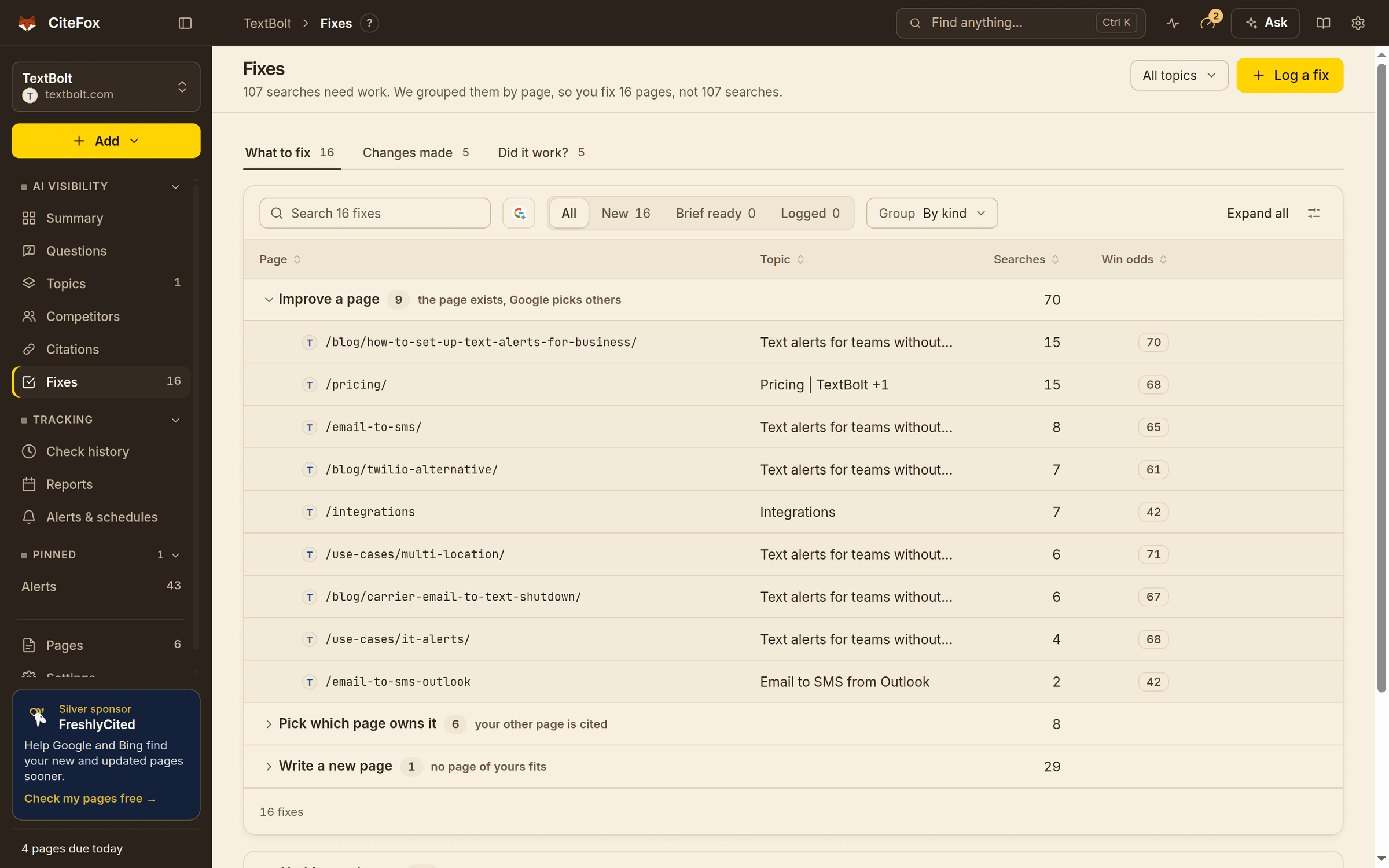
Know which page to fix and what to write, then see if it worked

Get a short brief for each page to improve or write. Log the change, and CiteFox re-checks the questions it should help for 14 days, then tells you whether it worked.

CiteFox Fixes screen with page fixes, logged changes and verdicts

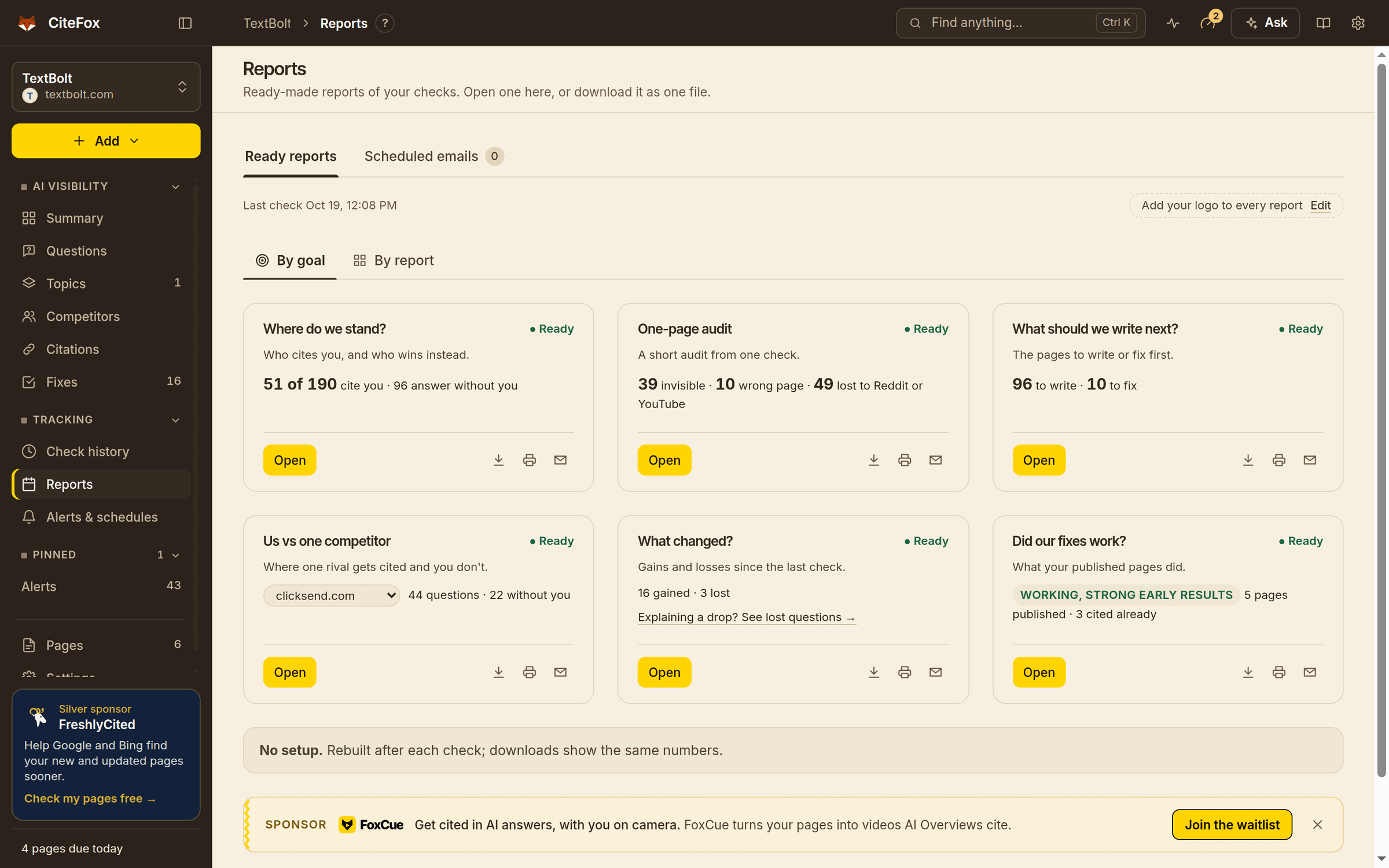
Prove results to clients in one click

Six AI visibility reports, rebuilt after every check. Read them in the app, download offline HTML, PDF or CSV, add your agency name and logo, or email them to clients on a schedule.

CiteFox Reports screen with six ready reports

Also in the app

  • Start fast: buyer questions written for you from your site, in the wording of each market
  • Get the right page cited: pick the target page that should win each question
  • Stay current without effort: re-checks run on a schedule while the app is closed, within a monthly budget you set
  • Hear about a lost citation first: alerts on the desktop, by email or in Slack when a target page drops out or a competitor is cited instead
  • Get answers, not spreadsheets: ask CiteFox in plain English about your results, with links to the rows
  • Bring what you have: import questions, pages and competitors from a sitemap, CSV or Excel file
  • Run every client in one place: many projects, each with its own markets and settings
  • Work your way: light and dark themes on Mac, Windows and Linux

From your website to your first fixes in three steps

  1. Add your website, get a ready setup

    CiteFox AI reads your site and works out what you sell, who buys it and who you compete with, so you start in minutes, not with a blank sheet.

  2. Get the questions your buyers are likely to ask

    CiteFox AI drafts them from your site, grouped into topics, in the wording of each country and language you sell in. You can edit them, add your own or import a list.

  3. See where you win, fix what you lose

    Every AI engine is asked and every answer saved. You see who is cited instead, get a brief for each fix, and scheduled re-checks show whether it worked.

CiteFox showing which buyer questions AI answers cite your site for, by engine

See every AI engine your buyers use, side by side

Every buyer question is asked on each engine you pick, in each market (country and language) you sell in.

EngineWhat CiteFox records
Google AI OverviewsThe AI answer at the top of Google results: whether one shows, its text and every source it links.
Google AI ModeGoogle’s full AI search answer and the sources it cites.
ChatGPTChatGPT answers to your buyer questions and the web sources they cite.
PerplexityPerplexity answers and their numbered sources.
GeminiGemini answers and the pages they cite.
CopilotMicrosoft Copilot answers and the pages they cite.

For every answer: whether your page is cited, which page, your brand named without a link, or not there at all, plus every other site cited.

Decide on real AI answers, not guessed “prompt volume”

Nobody has real prompt volume data. ChatGPT, Perplexity and Gemini don’t publish how often a question is asked, so every “prompt volume” figure is a modelled estimate (Ahrefs notes only Microsoft Copilot shares query data).

Chat assistants answer each person differently. ChatGPT can use your saved memories and past chats to tailor replies (OpenAI help), and other assistants now remember earlier conversations too.

Google’s AI Overviews are the steadier signal. No personal chat memory, and Google aims to keep results mostly the same for everyone. The wording stays close from day to day while the cited sources rotate (Ahrefs), so CiteFox anchors on AI Overviews, checks the other engines beside it, and re-checks on a schedule.

  1. Your buyer questions, drafted from your site

    CiteFox AI drafts them and you edit, add or import your own. Asked the three ways people ask: a short search, a question and a longer situation. Never with your brand name, so you see whether AI finds you on its own.

  2. Real answers, again and again

    Every check keeps the full answer and every source, so you follow trends, not one lucky or unlucky answer.

  3. The right page for each question

    A Primary page plus Also OK pages, so “cited” means the page you want, and every fix is measured before and after.

Prove results to clients in one click

Six client-ready AI visibility reports, rebuilt after every check. Each answers one question a client or a boss asks.

See the sample reportsTry Reports in the live demo

  • Visibility report

    Show where you stand and what is at stake: the opportunity, share of voice against competitors, the sources AI trusts, and how AI talks about the brand.

    For: Monthly client or leadership updates

  • What changed

    Answer “what moved since last time?” in one page: verdict first, then the questions that went up, down, in and out.

    For: Check-ins after each re-check

  • Impact review

    Prove your work paid off: each published page before and after, page by page, and what the client needs to do next.

    For: Proving the value of the work

  • Pitch / audit

    Win the meeting with a one-page audit from a single check: the gap, who wins instead, and what to fix first.

    For: Winning a new client, briefing a boss

  • Content plan

    Hand writers a ready plan: the pages to write or fix, by topic, each with a brief they can start from.

    For: Writers and content leads

  • Head-to-head

    Answer “why them and not us?”: the questions where one competitor is cited and you are not.

    For: Answering “why them and not us?”

  • Offline HTML, PDF and CSV downloads, with the same numbers as the app
  • Scheduled emails to clients
  • Branding for an agency (“Prepared for” each client), in-house, or plain
  • Every number drills down to the questions behind it, across all six engines or one at a time
  • Open the Reports home by goal (“Did our fixes work?”) or by report

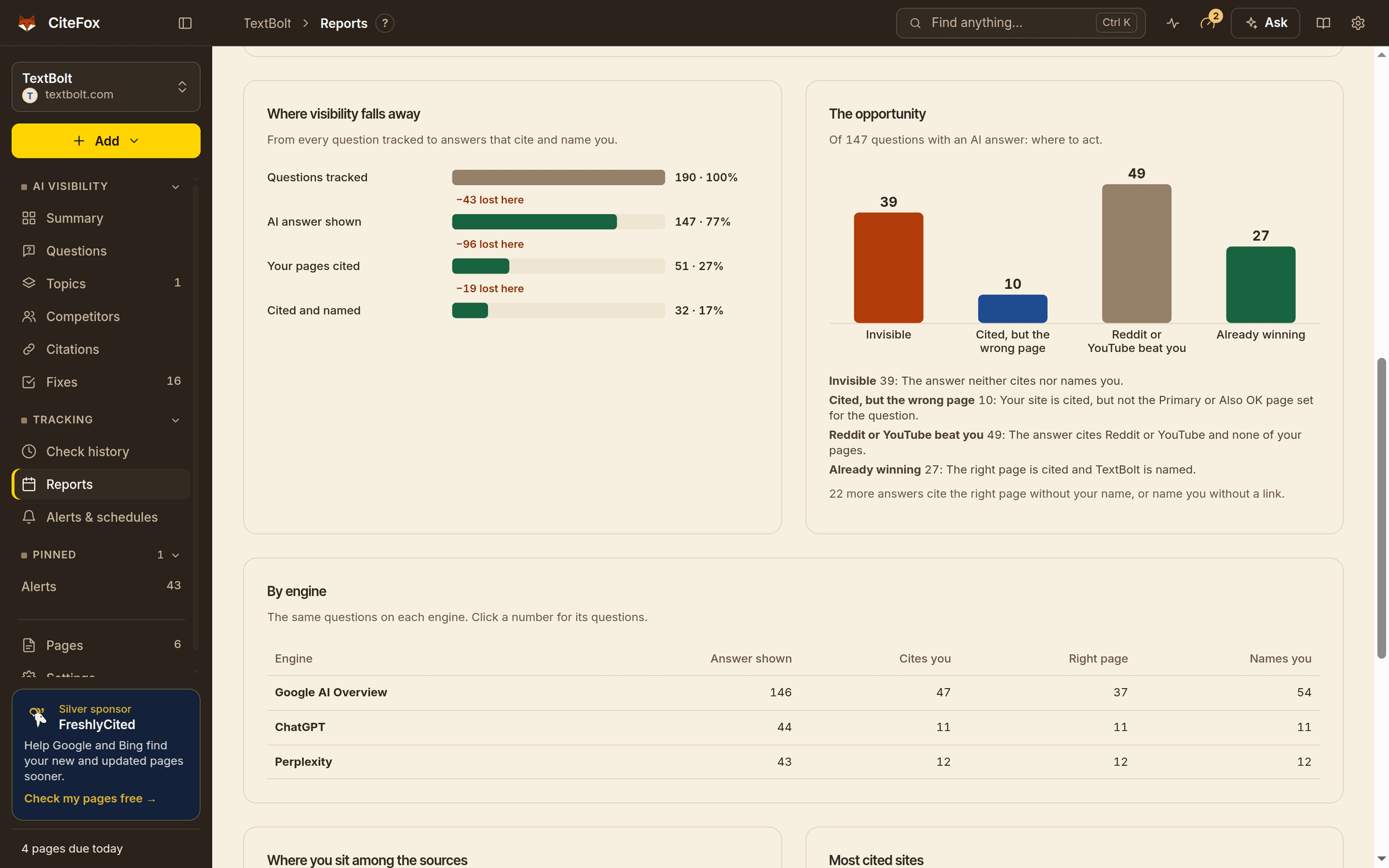
Open the sample reports, the same offline HTML files the app downloads, or try Reports in the live demo.

The CiteFox Visibility report with share of voice and the questions that cite you

Built for the people who answer for AI visibility

GEO vs SEO: why AI citations matter

SEO works to rank a page in the list of search results. GEO (generative engine optimization) and AEO (answer engine optimization) work to get a page cited as a source, or a brand named, inside an AI-written answer.

AI answers appear above the links or replace them. A page can rank well and still not be cited, and AI engines also cite pages that do not rank at the top.

Each engine picks its own sources, and answers change by country, language and over time. So citations have to be measured per engine and market, and checked again after every change.

CiteFox does that measuring: which questions cite you, which page, who is cited instead, and whether your fixes changed it.

Read the GEO and AEO glossary

Own your data, your costs and your client work

Pairs with Skald for AI crawlers and traffic. Skald is our free analytics that runs on your own server and reads its access log: every AI crawler and assistant visit by name, checked to be real, split by why it came, plus the people and leads AI answers sent you. CiteFox shows what AI says about you; Skald shows what AI does on your site.

Let an AI agent run it for you. CiteFox runs on Linux, so you can install it on an AI agent's own Linux computer, such as Grok Bot, Meta Muse or OpenAI dots, and have the agent run your checks and send your reports on a schedule. The MCP server, coming soon, makes this smoother.

Editions and roadmap

Want early access to Server, the managed service or the MCP server? Email getcitifox@gmail.com.

Source code, help and news on GitHub

Every line of CiteFox is on GitHub. Read it, check what it sends, build it yourself, or tell us what to build next.

About us

CiteFox is made by Space-O Technologies, a software development company in Canada. We made CiteFox free and source-available so anyone can see where AI answers cite them, keep their data, and fix what is missing.

We also make Skald, free analytics for AI crawlers and AI traffic that runs on your own server. Say hello at getcitifox@gmail.com or visit Space-O Technologies.

Frequently asked questions

What is CiteFox?

CiteFox is a free desktop app for Mac, Windows and Linux that tracks whether Google AI Overviews, Google AI Mode, ChatGPT, Perplexity, Gemini and Copilot cite your website for the questions your buyers ask. It shows which page is cited, who is cited instead, what to fix, and whether your fixes worked.

Where do the buyer questions come from?

CiteFox AI drafts them from your own website and from what you tell it about your buyers, then you edit them. It reads your pages, works out what you sell, who buys it, what makes them look for it and who you compete with, and writes questions a buyer would type before knowing your name, as a short search, a question or a longer situation. Each one is tied to the page that should answer it, and none names your brand. You can edit or delete any of them, ask for more, add your own, import a list from Excel or CSV, or let your own ChatGPT write them. They are not taken from real query data of the AI platforms, because those platforms do not share it. CiteFox instead asks every AI engine your questions and keeps the real answers and sources.

Is CiteFox free?

Yes. The app is free to download and use. You bring your own API keys: checks use pay-as-you-go credits from your own account with a search data service, and free tiers are enough to try it. CiteFox shows what a check will cost before it runs and stops at a monthly budget you set.

What API keys do I need?

A search data API, which asks the AI engines your questions (pay-as-you-go, a few cents per question), and for the AI work either Claude Code or Codex on the plan you already pay for (no extra cost) or a pay-as-you-go AI model API key. Setup links to each sign-up page and tests every key.

How do I check if Google AI Overviews cite my website?

Add your website in CiteFox and run a check. It asks Google each buyer question in the markets you pick, records whether an AI Overview appeared, and lists every source it cited, with your pages marked. Re-checks show what changed over time.

Can CiteFox track ChatGPT and Perplexity citations?

Yes. CiteFox asks ChatGPT, Perplexity, Gemini, Copilot and Google AI Mode the same questions as Google, and shows for each engine whether your site was cited, named without a link, or missing.

What is the difference between GEO, AEO and SEO?

SEO aims to rank pages in search results. GEO (generative engine optimization) and AEO (answer engine optimization) aim to get your pages cited, and your brand named, inside AI-written answers such as Google AI Overviews and ChatGPT. LLM SEO is another name for the same work.

Does CiteFox send my data to a server?

No. There is no CiteFox cloud. Your projects, questions, AI answers and reports stay in a local database on your computer, and your keys stay in your system keychain. CiteFox talks only to the services you connect and the pages you ask it to read. Its maker, Space-O Technologies, receives just two things: the details you give in the Join step, and an anonymous daily version ping.

Is CiteFox a free alternative to Profound or Peec AI?

For many agencies and marketers, yes. CiteFox is a free desktop app that tracks six AI engines (Google AI Overviews, AI Mode, ChatGPT, Perplexity, Gemini and Copilot), checks whether the right page is cited, gives each fix a 14-day verdict and builds branded client reports, with your data on your own computer. Profound and Peec AI are hosted services that lead on team dashboards, more engines, prompt volumes, AI crawler analytics and APIs. Many teams use CiteFox beside one of them. CiteFox is not affiliated with any of these companies.

Is there a server or team version?

Not yet. A self-hosted server edition, so a team or agency can run CiteFox on its own server and share it, is coming soon, and so are a subscription for done-for-you optimization and an MCP server so AI assistants can query your CiteFox data. Email getcitifox@gmail.com for early access.

Is CiteFox open source?

CiteFox is source-available, not open source. The full code is public on GitHub: you can read it, run it, change it for your own use and send improvements. Copies you share must keep the CiteFox name and sponsors. See the LICENSE file.

Can agencies use CiteFox for client reports?

Yes. The license allows use for your company’s clients. CiteFox has six ready reports (Visibility, What changed, Impact review, Pitch / audit, Content plan and Head-to-head) that you can brand with your agency name and logo, download as offline HTML, PDF or CSV, or email on a schedule.

What do I need to run CiteFox?

A Mac, Windows or Linux computer, a key for a search data API (CiteFox links to sign-up pages with free tiers and tests the key), and an AI model: your own AI model API key, or an AI assistant you already use on your computer under your own plan.

How does CiteFox compare with Profound, Peec AI and Otterly.AI?

CiteFox is a free desktop app that keeps your data on your computer, checks whether the page you want cited is the one cited, and gives each logged fix a 14-day verdict. Hosted tools such as Profound, Peec AI and Otterly.AI offer team dashboards, more engines, prompt volume data, AI crawler analytics and APIs. The comparison page has the full table, with a source for every fact.

Why does my computer warn me when I open CiteFox?

The Mac app is signed and notarized by Apple, so it opens like any other app (macOS may ask you to confirm it was downloaded from the internet). The Windows app is not signed with a paid certificate yet, so Windows asks once before the first start: choose More info, then Run anyway. Every release lists a SHA-256 checksum for each file.

Which countries and languages does CiteFox support?

You pick the markets: a country and language pair, such as United States · English or Germany · German. CiteFox writes the buyer questions in each market’s wording and checks each market separately, because AI answers differ by place and language.